Tumbleweed update - blank screen
You know how it is. You complete some tasks on your workstation, and think to yourself “it’s time to do a Tumbleweed update”. What could go wrong…
What went wrong
I’ve had this issue on two machines. Both were installed over 18 months ago.
After doing a zypper dup and a reboot the machine did not give a graphical login prompt.
One machine I’d previously removed splash=silent and quiet from the kernel command line in grub, so I just had the boot-up text scrolling up the screen.
The other machine did have the splash screen, and it just kept the spinner spinning.
Rollback and investigate
I could roll back both machines to a point before the zypper dup by selecting the Start bootloader from a read-only snapshot

From the list of options select, by date/time, the pre zypper snapshot from when you started the zypper dup which stopped the machine from booting.
It may not be the most recent pre zypper snapshot, because some install completion often happens at boot time.
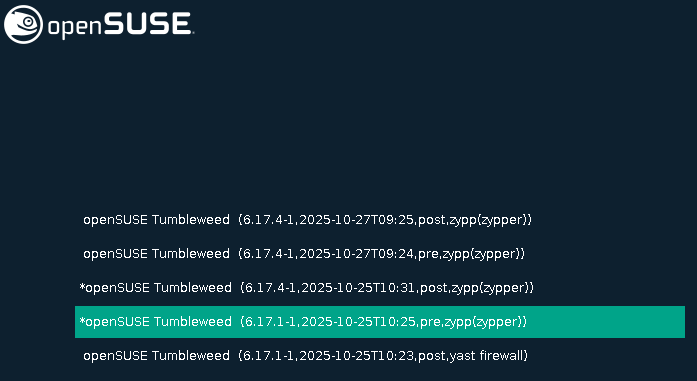
Once you are back at a state where the graphical login prompt, log in and as the root user run snapper rollback then reboot.
Fixing the issue
Most search results suggest this issue is an incompatibility in /etc/nsswitch.conf.
One fix is to remove or rename /etc/nsswitch.conf, so that the fall-back /usr/etc/nsswitch.conf is used instead.
mv /etc/nsswitch.conf /etc/nsswitch.conf.back
I also copied the fall-back /usr/etc/nsswitch.conf back into /et so I would not be confused in the future.
cp -a /usr/etc/nsswitch.conf /etc/nsswitch.conf
This should work unless your /etc/nsswitch.conf has been altered, for instance if you use LDAP for user authentication.
If that is the case then the fix is to patch the changes in the fall-back /usr/etc/nsswitch.conf into your /etc/nsswitch.conf.
The patching will probably end up being to add ‘systemd’ to the modules available for the passwd, group and shadow lookups in /etc/nsswitch.conf.
Those lines will end up looking like this:
passwd:         compat systemd
group:          compat [SUCCESS=merge] systemd
shadow:         compat systemd
What was the issue
The actual issue is that the Graphical Display Manager gdm installed in the October 2025 update requires “dynamic users”, user-IDs which are created on-the-fly by systemctl.
The /etc/nsswitch.conf does not include checking for “dynamic users” created by systemctl, but the fall-back /usr/etc/nsswitch.conf does.